
What Is an Access Review?
An access review is a formal process in which organizations evaluate user permissions across systems, applications, and data sources. The goal is to determine whether users have the appropriate level of access based on their current roles and responsibilities. This process typically involves identifying all users and their entitlements, assigning reviewers to validate access, and documenting decisions for audit and compliance purposes. Access reviews are a component of identity governance and help maintain security and regulatory compliance by ensuring that only authorized users retain access to sensitive resources.
Access reviews are often scheduled at regular intervals, quarterly, semi-annually, or annually, depending on regulatory requirements and the organization’s risk tolerance. The review may focus on specific groups, such as privileged users, or cover all identities across the enterprise. By systematically reviewing and validating access rights, organizations can detect and remediate unnecessary, outdated, or excessive access, reducing the attack surface and supporting the principle of least privilege.
In this article:
Why Are Access Reviews Important?
Access Certification vs. Continuous Access Review vs. Access Requests: What Is the Difference?
How the Access Review Process Works
Types of Access Reviews
Common Access Review Challenges
Access Review Best Practices: 8 Ways to Improve Your Process
What to Look for in Access Review Software
Why Are Access Reviews Important?
Access reviews are not just a compliance exercise. They reduce security risk and improve visibility into who can access what. Without regular reviews, access accumulates over time, leading to unnecessary exposure.
Reduce unauthorized access: Users often retain access after role changes or project completion. Reviews help identify and remove access that is no longer needed.
Enforce least privilege: By validating permissions, organizations ensure users have only the minimum access required to perform their jobs.
Compliance drivers: Many frameworks, such as SOX, SOC 2, ISO 27001, HIPAA, PCI-DSS, NYDFS, and NIS2, require periodic access validation. Reviews provide documented evidence for audits.
Detect toxic combinations and segregation-of-duties violations: Reviews can identify conflicting access rights that should not be assigned to the same user, such as the ability to both create and approve payments. Detecting these combinations helps enforce segregation of duties and reduces the risk of fraud, abuse, or policy violations.
Limit insider risk: Excessive or outdated access increases the risk of misuse, whether intentional or accidental. Reviews reduce this exposure.
Improve visibility and accountability: Assigning reviewers creates clear ownership over access decisions.
Detect access anomalies: Reviews can reveal unusual patterns, such as privilege creep or conflicting roles.
Strengthen security posture: Regular validation reduces the attack surface by eliminating unnecessary entry points into systems and data.
Maintain data integrity: Restricting access to authorized users helps prevent unauthorized changes, deletions, or data leaks.
Access Certification vs. Continuous Access Review vs. Access Requests: What Is the Difference?
These terms are related but refer to different identity and access management processes. Understanding the distinction helps organizations design effective governance workflows.
Access Certification
Access certification is the formal attestation process where managers, application owners, or data owners review and approve existing user access. The focus is on validating whether current permissions are still appropriate.
Certifications are usually periodic and campaign-based. For example, a finance manager may review all users with access to financial systems every quarter. Reviewers approve, revoke, or escalate access decisions, and the results are recorded for audit purposes.
Continuous Access Review
Continuous access review replaces or supplements periodic reviews with ongoing monitoring and automated evaluation of access rights. Instead of waiting for quarterly or annual campaigns, the system continuously checks for risky or unnecessary access.
This approach often relies on automation, analytics, and policy-based controls. Examples include:
Automatically flagging dormant accounts
Detecting privilege escalation
Identifying orphaned accounts after employee termination
Monitoring segregation-of-duties conflicts in real time
Access Requests
Access requests are operational workflows used to grant, modify, or remove access. A user requests access to a system or role, and the request is routed for approval based on predefined policies.
Unlike access reviews, which validate existing access, access requests deal with provisioning new access or changing current entitlements.
A typical workflow includes:
A user submits a request
Managers or application owners approve it
Access is provisioned automatically or manually
The action is logged for tracking and auditing
Key Differences
The following table summarizes the key differences:
Process | Primary Goal | Timing | Typical Outcome |
Access certification | Validate existing access | Periodic | Keep or revoke access |
Continuous access review | Continuously detect risky access | Ongoing | Automated remediation or alerts |
Access requests | Grant or modify access | On demand | New or updated permissions |
Together, these processes support the full access governance lifecycle: requesting access, validating it over time, and continuously monitoring for risk.
How the Access Review Process Works
Let’s review a typical access review process at a large enterprise.
1. Identify the Reviewable Population
The process starts with building an accurate inventory of identities, systems, and permissions. Organizations need visibility into all users, including employees, contractors, service accounts, privileged accounts, and external identities.
The review population also includes applications, infrastructure platforms, databases, shared folders, SaaS tools, and cloud environments. For each system, organizations identify entitlements such as roles, group memberships, permissions, and privileged access assignments.
This step is often difficult because access data is distributed across disconnected systems. Identity governance tools typically aggregate this information from directories, HR systems, cloud platforms, and business applications to create a centralized view.
Without a complete inventory, reviews can miss orphaned accounts, unmanaged applications, or excessive permissions that exist outside the formal identity management process.
2. Define the Review Scope and Trigger
After identifying available access data, organizations define what will be reviewed and why. Some reviews are broad enterprise-wide campaigns, while others focus on high-risk systems, privileged accounts, or sensitive business functions.
The scope may be based on:
Regulatory requirements
Risk assessments
Organizational changes
Application onboarding
Security incidents
Periodic certification schedules
Organizations also define the review trigger. Reviews can occur on a fixed schedule, such as quarterly or annually, or be event-driven. Common event triggers include employee termination, department transfers, mergers, or privilege escalation events.
Clearly defining scope prevents reviewers from being overloaded with unnecessary decisions and helps prioritize the highest-risk access.
3. Collect Access Data and Usage Telemetry
Once the scope is defined, the organization gathers current entitlement data and supporting context. This includes direct permissions, inherited access, group memberships, role assignments, and privileged entitlements.
Many organizations also collect usage telemetry to improve decision quality. Examples include:
Last login timestamps
Recent application activity
MFA usage
Privileged session history
Access request history
Risk scores from security tools
Usage data helps reviewers distinguish between actively used access and dormant permissions that may no longer be necessary.
Data quality is critical at this stage. Incomplete or outdated entitlement information can lead to incorrect approvals or unnecessary removals.
4. Assign Reviewers
Each access item must be assigned to someone responsible for validating it. Reviewers are selected based on the type of access being reviewed and the organization’s governance model.
Common reviewer types include:
Direct managers
Application owners
Data owners
Role owners
Security teams
Peer reviewers for specialized access
For example, a manager may review standard employee access, while a database administrator reviews privileged database permissions.
Organizations often use multi-stage reviews for sensitive systems. A manager may first validate business need, followed by a security or compliance review for high-risk entitlements.
5. Review User Access
Reviewers evaluate whether each user still requires their assigned access. The primary goal is to identify exceptions, excessive permissions, dormant access, and policy violations.
Modern access review programs try to reduce reviewer fatigue by minimizing low-risk decisions. Instead of reviewing every standard permission individually, organizations often exclude “birthright access,” which refers to baseline access automatically granted to all users in a role or department.
Reviewers focus on:
Privileged access
Sensitive data access
Temporary elevated permissions
Unused accounts
Segregation-of-duties conflicts
Access outside normal job functions
Many identity governance platforms provide recommendations based on peer analysis, risk scoring, or historical decisions to help reviewers make faster and more consistent decisions.
6. Remediate Excessive or Inappropriate Access
The review process is only effective if decisions result in actual remediation. When access is revoked or modified, organizations must ensure the change is implemented successfully.
In mature programs, remediation is automated through integration with identity providers, directories, cloud platforms, and target applications. This creates a closed-loop process where revocations are verified and tracked to completion.
Common remediation actions include:
Removing group memberships
Revoking privileged roles
Disabling dormant accounts
Deleting orphaned accounts
Adjusting role assignments
Triggering additional approvals
7. Document Review Evidence
Organizations must maintain evidence showing that reviews were completed properly. This documentation supports audits, investigations, compliance reporting, and internal governance requirements.
Typical evidence includes:
Review scope and campaign details
Reviewer assignments
Approval and revocation decisions
Timestamps and decision history
Remediation status
Exception justifications
Policy violations identified during the review
Most identity governance platforms maintain immutable audit logs and reporting dashboards for this purpose.
Types of Access Reviews
Access Review by Subject
1. User Access Reviews
User access reviews evaluate whether individual users still require access to systems, applications, and data. These are the most common type of access review and typically cover employees, contractors, vendors, and temporary workers. The goal is to verify that access aligns with current job responsibilities.
Reviewers examine group memberships, application roles, shared resource access, and inherited permissions to identify outdated or excessive access. User access reviews are often manager-driven because managers are expected to understand the business need for employee access.
Common review targets include:
Departed employees with active accounts
Users with access outside their department
Dormant or inactive accounts
Excessive permissions accumulated over time
Temporary access that was never removed
2. Privileged Access Reviews
Privileged access reviews focus on accounts with elevated permissions that can significantly impact systems, security, or business operations. These accounts present higher risk because they can modify configurations, access sensitive data, or bypass security controls.
The review typically covers:
Administrative accounts
Root or superuser privileges
Cloud IAM administrator roles
Database administrators
Security tooling access
Privileged access management (PAM) accounts
Organizations often review privileged access more frequently than standard user access because of the higher risk profile. Some privileged accounts may require monthly or continuous validation.
Reviewers pay close attention to:
Justification for elevated access
Temporary privileged assignments
Shared administrative accounts
Emergency access accounts
Unused privileged roles
3. Third-Party Access Reviews
Third-party access reviews evaluate access granted to external users, including vendors, partners, consultants, suppliers, and outsourced service providers. External identities often create governance challenges because they may not follow the same lifecycle processes as employees.
These reviews focus on:
Contract expiration alignment
Access scope limitations
Sensitive data exposure
Shared external accounts
MFA enforcement
Unused third-party accounts
4. Non-Human Identity (NHI) Access Reviews
Non-human identity access reviews focus on machine identities rather than human users. This includes service accounts, API keys, workloads, bots, automation scripts, and application identities. These identities often have persistent access and elevated permissions, making them a common attack target. In many environments, non-human identities outnumber human users.
The review evaluates:
Whether the identity is still active
The permissions assigned to the workload
Credential age and rotation status
Unused or orphaned service accounts
Hardcoded secrets or unmanaged keys
Excessive cloud permissions
5. Agentic Identity Access Reviews
Agentic identity access reviews focus on AI agents and autonomous systems that can independently perform actions across applications and infrastructure. These identities differ from traditional automation because they may dynamically access systems, make decisions, trigger workflows, or interact with sensitive data without direct human initiation.
Reviews evaluate:
The systems the agent can access
Allowed actions and operational boundaries
Data access permissions
API integrations
Escalation paths
Human oversight controls
Logging and traceability
Access Review by Scope
6. Application Access Reviews
Application access reviews focus on permissions within a specific application or platform. Instead of reviewing all enterprise access, the organization reviews access tied to one business system.
Examples include:
ERP platforms
CRM systems
HR applications
Cloud collaboration tools
Financial systems
Healthcare applications
The review may include:
User roles
Group memberships
Administrative permissions
Sensitive transaction capabilities
Data export privileges
7. Role-Based Access Reviews
Role-based access reviews evaluate access through the lens of organizational roles rather than individual permissions. Instead of validating thousands of separate entitlements, reviewers assess whether users are assigned to the correct roles and whether those roles contain appropriate permissions.
Typical review objectives include:
Identifying role bloat
Removing obsolete roles
Detecting overlapping role definitions
Validating role ownership
Reviewing toxic role combinations
8. Fine-Grained Entitlement Reviews
Fine-grained entitlement reviews examine highly specific permissions rather than broad roles or group assignments. They are technically complex because permissions are often inherited, nested, or condition-based. These reviews are common in cloud and SaaS environments where access models are highly granular.
Examples include:
AWS IAM policies
Azure RBAC assignments
Google Cloud IAM bindings
SaaS permission sets
API scopes
Kubernetes RBAC permissions
Organizations review:
Excessive cloud privileges
Wildcard permissions
Overly broad resource access
Unused permission sets
Cross-account trust relationships
High-risk API permissions
Access Review by Trigger
9. Scheduled (Campaign)
Scheduled access reviews occur at predefined intervals, such as quarterly, semi-annually, or annually. These reviews are typically organized as formal certification campaigns. Scheduled reviews are commonly used for compliance programs because they provide predictable governance cycles and auditable evidence.
The organization defines:
Review scope
Reviewer assignments
Deadlines
Escalation procedures
Reporting requirements
10. Event-Driven (Joiner-Mover-Leaver)
Event-driven access reviews are triggered by identity lifecycle changes rather than fixed schedules. These reviews help organizations respond quickly to changing business conditions and reduce the risk of outdated access persisting between periodic campaigns. For example, when an employee changes departments, the organization may automatically trigger a review of inherited access from the previous role.
Common triggers include:
New employee onboarding
Department transfers
Promotions
Contractor offboarding
Employee termination
Mergers and acquisitions
11. Risk-Driven (Anomaly or Policy Violation)
Risk-driven access reviews are initiated when security tools detect unusual behavior, excessive permissions, or policy violations. Unlike periodic reviews, these reviews focus on elevated-risk scenarios requiring immediate investigation.
Triggers may include:
Privilege escalation
Suspicious login activity
Segregation-of-duties violations
Dormant privileged accounts
Excessive cloud permissions
Data access anomalies
High-risk third-party access
Common Access Review Challenges
Here are some of the common challenges organizations face when implementing access reviews.
Incomplete Access Data
Incomplete or inaccurate access data is one of the most common issues in access reviews. When data sources are fragmented or not fully integrated, reviewers may not see the full picture of user entitlements. This can lead to missed risks, such as unreviewed accounts or hidden privileges in disconnected systems.
Organizations should integrate identity sources, directories, and applications to create a centralized dataset. Automated data collection and validation checks help ensure completeness and accuracy.
Fine-Grained Entitlements in Cloud and SaaS
Modern cloud platforms and SaaS applications use highly granular permission models, making access reviews significantly more difficult. Instead of broad roles, users may receive hundreds of individual permissions, API scopes, policy statements, or conditional access rules. Reviewers often struggle to understand the real impact of these permissions, especially when access is inherited through nested groups or indirect role assignments. Common issues include wildcard permissions, excessive cloud IAM policies, cross-account trust relationships, and shadow administrators created through indirect privileges.
The scale of cloud environments adds further complexity because organizations may manage millions of entitlements across multiple providers and SaaS platforms. To reduce risk, organizations use entitlement analysis, risk scoring, and cloud identity security tools to identify high-risk permissions and simplify reviews. Many platforms also translate technical permissions into business-readable descriptions so reviewers can make more informed decisions.
Identifying the Right Reviewer
Access reviews depend on assigning the correct reviewer, but ownership is often unclear in large or decentralized organizations. Managers may understand business need but lack technical knowledge, while application owners may understand permissions but not whether the user still requires access. Some systems may not have formally assigned owners at all, leading to delays, incorrect approvals, or superficial reviews. Outdated organizational data and shared ownership responsibilities also make reviewer assignment difficult.
Poor reviewer selection weakens the entire review process because reviewers may approve access without fully validating it. Organizations address this challenge by maintaining clear ownership models for applications, roles, and data. Many identity governance platforms also automate reviewer assignment using organizational hierarchy, entitlement type, or application metadata to improve accountability and review accuracy.
Lack of Usage Context for Reviewers
Reviewers often lack enough context to determine whether access is still necessary. A reviewer may see that a user has access to an application but have no visibility into whether the account is actively used, how frequently permissions are exercised, or whether the access supports an active business process. Without supporting data, reviewers frequently approve access by default to avoid disrupting operations.
Providing usage telemetry helps reviewers make more accurate decisions. Useful context includes last login activity, privileged session history, access request records, peer comparisons, device information, and risk scores from security tools. Many identity governance platforms integrate with SIEM, PAM, UEBA, and cloud monitoring systems to enrich reviews with behavioral data and identify dormant or risky access more effectively.
Reviewer Fatigue
Reviewer fatigue occurs when reviewers are overwhelmed by the volume or complexity of access decisions they must make. Large datasets, unclear entitlements, and repetitive tasks often lead to superficial reviews or blanket approvals. Over time, this weakens access controls and increases risk.
To address fatigue, organizations should simplify review tasks by grouping access logically, prioritizing high-risk items, and providing clear context for decisions. Automation, such as risk-based scoping or pre-approved rules, can reduce the number of manual decisions required.
Audit Evidence Gaps
Audit evidence gaps arise when organizations fail to properly capture or retain documentation of access review activities. Missing records of reviewer decisions, timestamps, or remediation actions can lead to audit findings and compliance issues.
Implementing centralized, tamper-evident systems for storing review data is necessary. These systems should automatically log decisions, track changes, and maintain a clear audit trail.
Access Review Best Practices: 8 Ways to Improve Your Process
Here are a few ways to ensure your access review process is effective.
1. Use a Risk-Based Approach
Not all access carries the same level of risk, so organizations should prioritize reviews based on the sensitivity of systems, data, and permissions. High-risk access, such as privileged administrator roles, production infrastructure, financial systems, and sensitive customer data, should receive more frequent and detailed review than standard low-risk access. This allows organizations to focus limited review resources on the areas most likely to create security or compliance exposure.
Risk-based reviews also improve scalability in large environments where reviewing every entitlement equally is impractical. Many organizations use identity analytics, behavioral monitoring, and risk scoring to identify risky users, toxic permissions, dormant accounts, or unusual access patterns. These insights help reviewers focus on the most important decisions instead of manually validating large volumes of low-risk access.
2. Give Reviewers Context
Reviewers make better decisions when they understand how access is actually being used. Access reviews should include contextual information such as last login timestamps, recent application activity, privileged session history, MFA usage, access request records, and associated business roles. Without this information, reviewers often approve access simply because they cannot confidently determine whether it is still needed.
Usage telemetry helps reviewers identify dormant accounts, unused privileged access, temporary permissions that were never removed, and abnormal behavior patterns. Modern identity governance platforms often integrate with SIEM, PAM, UEBA, and cloud monitoring tools to enrich reviews with behavioral data. This additional context improves decision quality, reduces unnecessary approvals, and shortens review time.
3. Focus on Exceptions, Not Birthright Access
Review programs become inefficient when reviewers repeatedly validate standard low-risk permissions that all users automatically receive as part of their role or department. This type of baseline entitlement, commonly called birthright access, usually does not require detailed manual review unless risk conditions change. Reviewing every low-risk entitlement individually increases workload without significantly improving security.
Organizations should instead focus reviewer attention on exceptions such as privileged access, temporary elevation, unusual role assignments, dormant accounts, sensitive data access, and permissions outside normal job functions. By narrowing the review scope to higher-risk access, organizations reduce reviewer fatigue and improve the likelihood that reviewers carefully evaluate important decisions.
4. Avoid Rubber-Stamp Approvals
Access reviews lose effectiveness when reviewers approve large numbers of entitlements without proper validation. This behavior, commonly called rubber-stamping, often occurs when reviews contain too many items, use unclear entitlement descriptions, or provide insufficient context for decision-making. In some cases, reviewers may approve everything quickly simply to complete assigned tasks before deadlines.
Organizations can reduce rubber-stamping by simplifying review interfaces, grouping related permissions logically, prioritizing high-risk access, and limiting unnecessary review scope. Many identity governance platforms also monitor reviewer behavior and flag suspicious activity, such as bulk approvals completed unusually quickly. Training reviewers on the importance of access governance further improves review quality and accountability.
5. Detect Toxic Combinations and SoD Violations
Access reviews should identify segregation-of-duties (SoD) conflicts and toxic permission combinations that could enable fraud, abuse, or policy violations. Examples include users who can both create and approve payments, modify and audit financial records, or administer and monitor the same security controls. Individually, each permission may appear legitimate, but the combined access creates elevated risk.
Modern identity governance tools continuously analyze entitlement relationships across systems to detect these conflicts automatically. Organizations should define SoD policies clearly and integrate them directly into review workflows so reviewers can evaluate combined risk exposure rather than isolated permissions. Identifying and remediating toxic combinations helps strengthen internal controls and supports regulatory compliance.
6. Connect Access Reviews to Joiner-Mover-Leaver Processes
Access reviews are more effective when integrated with identity lifecycle management processes. Employee onboarding, promotions, department transfers, contractor changes, and terminations frequently create outdated or excessive access if permissions are not updated promptly. Waiting for the next quarterly or annual review allows unnecessary access to persist for extended periods.
Connecting reviews to joiner-mover-leaver workflows enables organizations to trigger targeted reviews automatically when identity changes occur. For example, a department transfer can automatically initiate validation of legacy access from the employee’s previous role. This integration reduces privilege creep, improves access accuracy, and minimizes the amount of stale access that accumulates over time.
7. Track Remediation to Completion with Closed-Loop
Identifying excessive or inappropriate access is only valuable if remediation actions are fully completed. In some organizations, review decisions are documented but revocations are delayed, fail silently, or are never implemented in target systems. This creates a gap between governance processes and actual risk reduction.
Organizations should implement closed-loop remediation processes that verify whether approved changes were successfully enforced. Automated integrations with identity providers, directories, cloud platforms, and business applications help ensure revocations occur consistently and quickly. Mature programs also track remediation status, escalation paths, failed actions, and exception handling to confirm that review outcomes result in measurable security improvements.
8. Track Access Review Metrics and KPIs
Access review programs require measurable KPIs to evaluate effectiveness, identify operational weaknesses, and demonstrate governance maturity. Without them, organizations may complete review campaigns without knowing whether the process is actually reducing risk. Effective metrics also support continuous improvement, surfacing trends like recurring policy violations, slow remediation workflows, or excessive approval behavior.
Key metrics to track:
On-time completion rate measures the percentage of reviews completed within the defined review period or compliance deadline. Low rates often point to unclear ownership, excessive scope, reviewer overload, or poor process design. Tracking by department, application owner, or risk category helps pinpoint bottlenecks.
Revocation rate measures how much access is removed or modified during review campaigns, and serves as a signal of whether reviews are doing real work. A consistently low rate suggests reviewers are approving access without genuine evaluation. An unusually high rate points to upstream governance problems.
Average time-to-remediate measures how long it takes to remove or modify access after a review decision is made. Even when risky access is correctly flagged, delayed remediation extends the exposure window. Organizations typically measure remediation timelines separately for standard access, privileged accounts, and high-risk violations.
Rubber-stamp rate (approvals under N seconds) measures how frequently reviewers approve access decisions unusually quickly, within only a few seconds per item, suggesting they are not meaningfully evaluating permissions. Tracking this metric helps identify overloaded reviewers, ineffective review design, or low-quality governance practices.
What to Look for in Access Review Software
Not all access review platforms deliver the same level of automation, intelligence, or operational value. When evaluating solutions, organizations should look beyond feature checklists and assess whether the platform actually eliminates the manual bottlenecks and governance gaps that make access reviews slow and unreliable:
Deployment speed and time-to-value: One of the biggest IGA pain points is deployment and maintenance. Look for platforms that support new integrations within weeks and go live in hours once deployed, not months-long implementation projects that delay security outcomes.
Operations and compliance coverage, not just visibility: Discovery tools show you the problem but don't fix the provisioning bottleneck or stop rubber-stamping. Look for platforms with unified identity, access, and entitlement visibility, which automate governance decisions and plug into operational workflows. Specifically, seek platforms that reduce access request backlogs, eliminate rubber-stamp reviews, and streamline audit preparation.
Specialized AI, not generic AI: There's a meaningful difference between general-purpose AI and models purpose-built for identity structures and access patterns. Look for models that understand how permissions cascade across directories, how SaaS permission sets interact, and what normal access patterns look like in your environment.
Reviewer context to prevent rubber-stamping: Managers lack context when reviewing access. You're reviewing "Should Bob have admin access to the financial system?" but you don't know what Bob does with it, when he last used it, or if his peers have it. Without context, reviewers hit "approve" because breaking something is worse than maintaining overprivileged access. The platform should surface usage data, peer comparisons, risk scores, and behavioral signals to support meaningful decisions.
Integration with existing identity infrastructure: Solutions need to work with existing IGA platforms, identity providers, and ITSM tools rather than requiring a full rip-and-replace. Most organizations have significant investments in existing IAM; it's better to integrate, handle the high-friction processes legacy platforms can't manage, and deliver value quickly.
Support for AI agent and non-human identity governance: AI agents are moving at machine speed while governance is still stuck in manual-approval workflows. When you have thousands of agents requesting access dynamically, you need automated governance that operates at the same speed while still making intelligent, risk-aware decisions. Platforms that can only govern human identities will leave a growing portion of your environment unmanaged.
Measurable operational outcomes: Measure success by operational metrics: how much does the platform reduce your access request backlog? Does it eliminate rubber-stamping? Can it cut audit prep from 10 people for two weeks to one person in hours? If a demo focuses on pretty graphs showing agent inventory, the vendor is solving the wrong problem.
Least privilege enforcement: The platform should continuously validate that users hold only the minimum access required, not just flag violations during campaigns.
Continuous access intelligence, not just periodic reviews: Governance should operate between campaigns, not only when a review is scheduled.
SoD and toxic combination detection: The platform should automatically identify conflicting access rights across systems, not just evaluate individual entitlements in isolation.
Learn more in our detailed guide to user access review software
Access Reviews with Opti
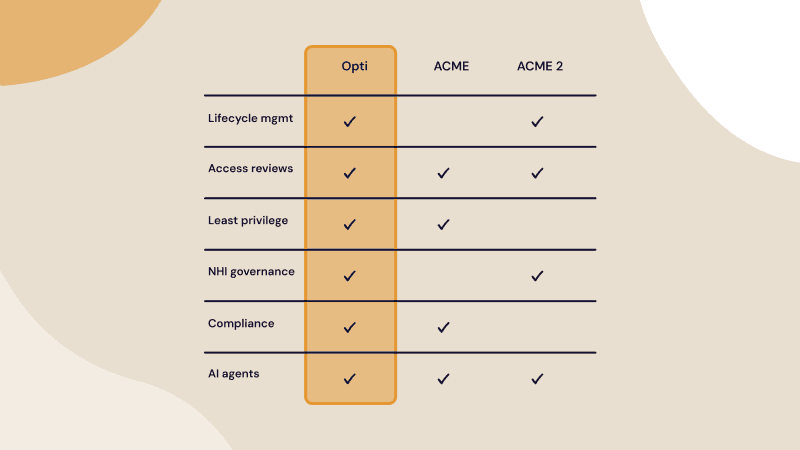
Opti is an AI-native identity security platform with automated user access reviews as one of its core pillars. Unlike tools that only execute the review itself, Opti covers the full cycle: from preparing the review (aggregating access data, mapping identities, and surfacing context) to running it, to closing the loop on remediation. Everything is in one place. Purpose-built AI models surface high-risk access first, auto-handle low-risk decisions, and give reviewers the usage context they need to certify with confidence, not guesswork. Opti covers human, non-human, and agentic identities from a single platform and deploys in hours, not months.
Opti’s key features include:
Risk-scored access reviews: High-risk access flagged and prioritized, low-risk deprioritized or auto-handled
Reviewer context built in: Last-used telemetry, peer comparisons, and behavioral signals surface automatically so reviewers stop guessing
Closed-loop remediation: Revocations are executed and verified, not just ticketed
Comprehensive coverage: Human, non-human, and agentic identities
Continuous access intelligence: Governance doesn't stop between campaigns
Audit trail that maintains itself: Documentation is automatic, not a pre-audit scramble