What Are User Access Reviews?
A user access review (UAR) is a formal, periodic audit of user permissions to ensure employees and third parties only have the access necessary for their roles (least privilege). It safeguards data, mitigates "privilege creep," and satisfies regulatory compliance (e.g., SOX, HIPAA, GDPR). The process involves identifying the scope, reviewing access, revoking unnecessary rights, and documenting for auditors.
The UAR process helps ensure that only authorized individuals retain access to critical resources, reducing the risk of data breaches and internal misuse. Access reviews typically involve both automated tools and manual oversight, requiring input from managers, system owners, or IT administrators to validate the necessity of each user’s access.
The scope of user access reviews can range from simple lists of users with active accounts to detailed breakdowns of what specific permissions each user holds. The aim is to identify accounts with excessive, outdated, or unnecessary access, such as those belonging to former employees, contractors, or users who have changed roles.
Why Are User Access Reviews Important?
User access reviews are not just a compliance exercise. They reduce security risk and improve operational control. Regular reviews help organizations stay aligned with the principle of least privilege and ensure access reflects current business needs.
Reduce risk of unauthorized access: Identify users who should no longer have access, such as former employees or contractors.
Enforce least privilege: Reset permissions so users only have what they need to perform their job.
Detect privilege creep: Highlight excessive permissions caused by role changes or temporary access.
Detect toxic combinations and segregation-of-duties violations: Identify conflicting access rights that could allow users to bypass controls, commit fraud, or perform sensitive actions without oversight.
Improve accountability: Assign managers or system owners to validate access decisions.
Prevent data breaches: Reduce excess or outdated access to sensitive systems.
Strengthen internal controls: Validate access regularly rather than relying only on initial provisioning.
User Access Review vs. User Access Management
User access management (UAM) is the broader process of controlling user identities and their permissions throughout their lifecycle in an organization. This includes onboarding new users, provisioning or deprovisioning access, and updating permissions as roles change. UAM is a continuous process, often involving automated workflows and policy enforcement to ensure users have appropriate access at all times.
User access reviews are periodic, point-in-time evaluations of existing access rights. While UAM focuses on granting and managing access day to day, access reviews act as checkpoints to validate the current state of access against business needs and compliance requirements. Access reviews can identify gaps in UAM processes, creating a feedback loop for improving access control practices.
Related content: Read our complete guide to identity governance and administration (IGA).
Key Types of User Access That Should Be Reviewed
Non-Human and Service Account Access
Non-human and service accounts are identities used by applications, scripts, APIs, automation tools, and infrastructure services rather than individual users. These accounts often run background tasks, integrate systems, or support automated workflows. Because they typically operate continuously and may hold elevated permissions, they can become high-risk targets if not properly monitored.
Access reviews should verify that service accounts are still required, have appropriate permissions, and follow security best practices such as credential rotation and scoped access. Organizations should identify orphaned accounts, shared credentials, and accounts with unnecessary privileges. Since service accounts are often overlooked during standard reviews, they can accumulate excessive access over time and create hidden attack paths for attackers.
Agentic and AI Identity Access
Agentic and AI identities refer to autonomous systems, AI agents, machine learning services, and generative AI tools that interact with enterprise systems and data. These identities may access APIs, databases, cloud platforms, collaboration tools, or internal applications to perform tasks on behalf of users or business processes. As organizations adopt AI-driven automation, these identities increasingly require their own governance and access controls.
User access reviews should evaluate what systems AI agents can access, what actions they can perform, and whether those permissions remain appropriate. AI systems often process sensitive information or execute automated actions at scale, making excessive access particularly risky. Reviews should verify that permissions are limited to defined use cases and that AI identities cannot access unrelated systems or sensitive data without authorization.
Application Access
Application access refers to users’ permissions to log in to and use specific software tools, platforms, or cloud services. Reviewing application access ensures that only current employees or authorized third parties can use business-critical applications, reducing the risk of data leakage or unauthorized actions. Regular reviews also help detect dormant accounts or unnecessary licenses that could be deactivated or reassigned.
It is important to review application access for systems that handle sensitive data, financial transactions, or customer information. Over time, users may accumulate access to multiple applications that are no longer relevant to their roles. By reviewing and removing these permissions, organizations can reduce their attack surface and maintain compliance with data protection standards.
Group and Role-Based Access
Group and role-based access controls assign permissions based on a user’s membership in predefined groups or roles, such as “HR,” “Finance,” or “IT admin.” This approach simplifies access management but can lead to permission creep if users remain in groups after their responsibilities change. Reviewing group and role memberships helps ensure that users only have access aligned with their current duties.
These reviews should verify both group membership and the permissions assigned to each group or role. Misaligned group access can grant users privileges they do not need, increasing the risk of accidental or intentional misuse. Reviewing and updating group and role assignments keeps access controls accurate and aligned with organizational changes.
Privileged Access
Privileged access refers to permissions that allow users to perform administrative functions, such as managing servers, configuring security settings, or accessing sensitive data repositories. Privileged accounts are prime targets for attackers because they offer elevated control over critical systems. Reviews help ensure only trusted personnel retain privileged access and that such access is revoked when no longer needed.
In addition to verifying legitimate use, privileged access reviews should check for signs of privilege escalation or misuse. Organizations should document the justification for all privileged accounts and remove any that are dormant or unnecessary. This reduces the risk of insider threats and limits the impact of compromised credentials.
External and Guest User Access
External and guest user access covers accounts provided to vendors, contractors, partners, or temporary users. These accounts often require limited or time-bound access to specific resources. Reviewing external and guest access ensures that permissions are not left active after projects end or business relationships change.
Reviews should validate the continued business need for each external or guest account and confirm that access is appropriately restricted. Any accounts without a clear, ongoing justification should be deactivated. This reduces the risk of unauthorized access from unmanaged third-party accounts.
Sensitive Data Access
Sensitive data access involves permissions to view, modify, or extract data classified as confidential, regulated, or critical. These permissions should be reviewed more frequently due to the higher risk associated with exposure or misuse. Regular reviews help ensure that only users with a legitimate business need can access sensitive information.
When reviewing sensitive data access, organizations should assess not only who can access the data but also whether the level of access is appropriate, for example, read-only versus write. Any instances of excessive or outdated access should be corrected. This reduces the risk of data breaches and supports compliance with data privacy laws and industry standards.
How Often Should User Access Reviews Be Performed?
Most organizations should perform user access reviews quarterly. This cadence aligns with common audit cycles and gives teams enough time to find stale accounts, excessive access, and missing approvals before they become audit findings.
Some environments need a different schedule:
SOX-controlled systems: Review access quarterly or semi-annually, depending on internal control requirements.
PCI DSS environments: Perform quarterly reviews for systems that store, process, or transmit payment card data.
ISO 27001 environments: Review access periodically, commonly quarterly or semi-annually.
HIPAA-regulated environments: Set review frequency based on risk assessments, with more frequent reviews for systems containing protected health information.
Highly regulated or complex environments: Review access more often than quarterly when there are many applications, sensitive data, fast role changes, or strict audit requirements.
Lower-risk systems: Semi-annual reviews may be acceptable when data sensitivity is low and user roles change infrequently.
Reviews should also happen after major events, such as reorganizations, system migrations, contractor offboarding, or changes to privileged access. Automation can help keep reviews on schedule by assigning tasks, sending reminders, tracking approvals, and storing evidence for auditors.
The User Access Review Process: Step-by-Step
A user access review should include the following steps:
Identify the reviewable population: Before starting a user access review, organizations need a complete inventory of identities, applications, systems, and entitlements that fall within the review scope. This includes employee accounts, contractor accounts, service accounts, AI identities, privileged accounts, cloud roles, SaaS applications, groups, and data repositories. Without a reliable inventory, reviews can miss unmanaged systems or hidden access paths.
Define the scope and trigger: The review process starts by defining what will be reviewed and why the review is occurring. Reviews may be triggered by regulatory requirements, internal policy schedules, organizational changes, security incidents, mergers, or role transitions. The trigger determines the urgency, scope, and level of scrutiny required. The scope should clearly define which systems, applications, business units, user populations, or data types are included.
Collect access data and usage telemetry: Once the scope is defined, organizations collect current access information along with usage and activity data. Access data alone only shows what permissions users have, while usage telemetry helps determine whether those permissions are actually being used. Collected data may include user accounts, group memberships, roles, permissions, login history, privileged activity, API usage, access request history, and authentication events.
Assign reviewers: Access reviews should be assigned to individuals with enough business or technical context to make informed decisions. Depending on the type of access being reviewed, reviewers may include direct managers, application owners, data owners, role owners, security teams, or designated peers.
Review access rights: During the review, reviewers evaluate whether each user’s access remains appropriate based on their role, responsibilities, and business need. The focus should be on identifying exceptions, excessive privileges, unusual access patterns, and high-risk entitlements rather than repeatedly approving standard birthright access that users automatically receive through their role.
Remediate inappropriate access: When inappropriate, excessive, or outdated access is identified, remediation must be completed through a closed-loop process. Creating a ticket alone is not sufficient. Organizations need confirmation that the access was actually removed, modified, or corrected within the target timeframe. Closed-loop remediation includes tracking actions from identification through completion and verification.
Document evidence: Record the outcomes of the review, including decisions made, actions taken, and approvals provided. This creates an audit trail that demonstrates control over access and supports compliance requirements. Evidence typically includes reviewer names, timestamps, and before-and-after states of access. Structured documentation also supports future reviews.
Monitor and repeat: User access reviews are ongoing. Monitor access patterns and schedule the next review cycle based on risk and system criticality. Monitoring tools can detect changes between review cycles, such as new accounts, privilege escalations, or unusual access behavior. Establish a repeatable process with defined intervals. Insights from each cycle should feed back into access management practices, improving role definitions, automation, and policy enforcement.
User Access Review Challenges
Incomplete Access Data
Many organizations do not have a single source of truth for user access. Permissions are spread across on-premises systems, cloud platforms, SaaS applications, directories, and custom applications, making it difficult to build a complete view of who has access to what.
To reduce this problem, organizations should aggregate identity and entitlement data from all relevant systems before starting a review. Maintaining an accurate inventory of applications, accounts, groups, and permissions helps prevent important access from being excluded from the review process.
Fine-Grained Entitlements in Cloud and SaaS
Modern cloud platforms and SaaS applications often expose thousands of individual permissions, roles, and resource-level entitlements. Reviewing these permissions one by one is impractical, especially in large environments where users inherit access through multiple groups and roles.
Organizations should present reviewers with business-friendly views of access rather than raw permission lists. Grouping permissions into roles, highlighting high-risk entitlements, and using automated risk scoring help reviewers focus on the access that matters most.
Identifying the Right Reviewer
The person approving access is not always the person who understands whether it is still needed. Managers may not know the details of application permissions, while application owners may not understand a user's current business responsibilities.
Organizations should define ownership for each type of access before review campaigns begin. Depending on the system, reviews may be routed to managers, application owners, data owners, or multiple reviewers to ensure decisions are made by people with the appropriate context.
Lack of Usage Context for Reviewers
A list of permissions alone provides limited information. Reviewers often cannot tell whether an entitlement is actively used, was granted temporarily, or has remained unused for months.
Providing login history, recent activity, privileged operations, and last-used timestamps helps reviewers make more informed decisions. Usage data makes it easier to identify dormant accounts, unnecessary permissions, and temporary access that should be removed.
Rubber-Stamp Approvals
When reviewers receive large numbers of access decisions, they may approve everything without careful evaluation to complete the review quickly. These rubber-stamp approvals reduce the effectiveness of the review and allow excessive access to persist.
Organizations can reduce approval fatigue by prioritizing high-risk access, filtering out standard low-risk entitlements, and using automation to approve routine cases. Requiring justification for sensitive access decisions and auditing reviewer behavior also improves the quality of review outcomes.
User Access Review Best Practices
Here are some of the ways to improve the user access review process.
1. Give Reviewers Context, Including Last-Used Telemetry
Reviewers should not make decisions from static access lists alone. Include context such as last login, last-used entitlement, recent privileged activity, access request history, department, job title, manager, and account status.
This helps reviewers decide whether access is still needed or has become stale. For example, a user who has not used a finance application in six months may no longer need access, even if they still belong to a finance-related group.
Usage context also helps reduce unnecessary removals. Some access may be used rarely but still be required for quarterly reporting, audits, or emergency support. Reviewers need enough information to distinguish valid low-frequency use from unused access.
2. Include Non-Human and Agentic Identities in Reviews
Access reviews should include service accounts, API keys, bots, automation scripts, cloud workloads, and AI agents. These identities often have persistent access and may not be tied to a normal employee lifecycle process.
Each non-human identity should have a named owner, documented purpose, approved scope, and defined expiration or review date. Without ownership, teams may be unable to confirm whether the identity is still required.
Agentic identities need special attention because they may act across systems or perform tasks automatically. Reviews should confirm what data they can access, what actions they can take, and whether those permissions match their approved use case.
3. Automate Revocation and Close the Loop on Remediation
Access reviews should not stop at approval or rejection. When access is marked for removal, the process should track whether the change was actually completed in the source system.
Automation can remove access directly, create service tickets, notify system owners, and verify completion. This reduces delays and prevents risky access from remaining active after a reviewer has already rejected it.
A closed-loop process also improves audit readiness. Teams can show when access was reviewed, who made the decision, what action was taken, and when remediation was completed.
4. Apply the Principle of Least Privilege
The principle of least privilege means users should only have the access required for their current work. Access reviews help enforce this by finding permissions that are excessive, outdated, or unrelated to the user’s role.
Reviewers should pay close attention to broad roles, administrative permissions, sensitive data access, and group memberships that grant access to many systems. These permissions create more risk than standard user access.
Least privilege should also apply to temporary access. Project-based or emergency access should have an expiration date and should be removed when the business need ends.
5. Match Reviews to the Right Reviewer
Review decisions should be assigned to people who understand the access being reviewed. A direct manager may understand the user’s job duties, but an application owner may better understand what a specific entitlement allows.
Where needed, use more than one reviewer. For example, a manager can validate business need, while a data owner can approve access to regulated or sensitive information.
The review interface should explain permissions in clear business terms. Reviewers are more likely to make accurate decisions when they can see what a role allows, why it was granted, and what risk it carries.
6. Automate the Full Review Cycle, Not Just Approvals
Automation should support the full review cycle, not only the approval workflow. It can assign reviews, send reminders, escalate overdue tasks, generate evidence, and trigger removal actions.
Automated remediation reduces manual errors and shortens the time between identifying inappropriate access and removing it. This is especially important for privileged accounts and sensitive systems.
Organizations should still monitor automated changes. Failed removals, disconnected applications, and manual exceptions should be flagged so security or application teams can resolve them.
7. Right-Size Access When Roles Change
Role changes are a common source of privilege creep. When employees move to new teams, take on new duties, or transfer locations, their old access may remain active unless it is specifically reviewed.
Access should be adjusted when a user changes role, not only during scheduled quarterly or annual reviews. This includes removing permissions tied to the previous role and granting only what is needed for the new one.
Right-sizing should also account for inherited access through groups and roles. Removing one direct permission may not reduce risk if the user still receives the same access through another group.
8. Include Non-Human Identities in Reviews
Non-human identities should be reviewed with the same discipline as employee accounts. This includes service accounts, database accounts, robotic process automation users, cloud identities, and integration accounts.
Reviews should confirm that each identity is still active for a valid business purpose. Accounts tied to retired applications, old integrations, or former projects should be disabled or removed.
Permissions should be scoped narrowly. Non-human identities should not use shared administrator accounts or broad roles when a limited permission set is enough to complete the task.
9. Focus on Exceptions, Not Birthright Access
Birthright access is standard access automatically granted based on role, department, or employment status. Reviewing this access repeatedly creates unnecessary work when the role model is already approved and functioning correctly.
Instead, reviews should prioritize exceptions. These include privileged access, sensitive data access, manual overrides, access outside the user’s role, recently granted emergency access, and permissions with no recent usage.
This approach reduces reviewer fatigue and improves review quality. Reviewers can spend more time on decisions that require judgment instead of approving routine access that should be governed through policy.
10. Detect Toxic Combinations and SoD Violations
Toxic combinations occur when a user has multiple permissions that become risky when combined. A single permission may be acceptable, but the combination can allow fraud, abuse, or control bypass.
Common examples include creating vendors and approving vendor payments, requesting access and approving the same request, or deploying code and approving production changes. These conflicts are especially important in finance, procurement, IT, and compliance processes.
Access reviews should include automated checks for segregation-of-duties violations across systems. When conflicts cannot be removed, organizations should document compensating controls such as secondary approval, monitoring, or periodic transaction review.
11. Use HRIS as the Source of Truth for Scope and Reviewer Assignment
The HRIS should provide the authoritative record for employment status, department, job title, manager, location, and worker type. This information helps define who should be included in a review and who should approve their access.
Using HRIS data reduces errors caused by outdated spreadsheets or manual reviewer assignments. It also helps identify terminated workers, transferred employees, contractors, and users with missing or incorrect manager data.
HRIS integration supports stronger joiner, mover, and leaver controls. When a user joins, changes role, or leaves the organization, access reviews and access changes can be triggered based on trusted workforce data.
User Access Review Metrics and KPIs
User access reviews should be measured like any other security or governance process. Tracking metrics and KPIs helps organizations evaluate review quality, identify bottlenecks, improve remediation speed, and detect weak controls. Strong metrics also provide evidence to auditors and leadership that access governance processes are operating effectively.
Organizations should track both operational efficiency and security effectiveness. Metrics should focus not only on whether reviews were completed, but also on whether risky access was identified and properly remediated.
On-time completion rate: Measures the percentage of access reviews completed within the required timeframe. Low completion rates may indicate reviewer fatigue, unclear ownership, or overly broad review scopes.
Revocation rate: Tracks how often access is removed or reduced during review cycles. A consistently low revocation rate may suggest reviewers are rubber-stamping approvals or that roles and provisioning processes are already highly optimized.
Average time-to-remediate: Measures how long it takes to remove or correct inappropriate access after it is identified. Faster remediation reduces exposure windows and demonstrates operational maturity.
Rubber-stamp rate: Identifies reviews completed suspiciously quickly, such as approvals made within only a few seconds. High rubber-stamp rates can indicate reviewers are approving access without meaningful validation.
Percentage of dormant accounts identified: Measures how many inactive or unused accounts are discovered during reviews. Dormant accounts often represent an unnecessary security risk and should be removed promptly.
Privileged access review completion rate: Tracks completion specifically for high-risk or administrative accounts. Privileged access reviews are often subject to stricter timelines and controls.
Segregation-of-duties violation rate: Measures how many toxic access combinations or policy conflicts are identified during reviews. Tracking trends helps organizations evaluate the effectiveness of role design and policy enforcement.
Reviewer reassignment rate: Measures how often reviews must be reassigned because the original reviewer lacked context or ownership. High reassignment rates may indicate poor HRIS data or unclear governance structures.
How to Streamline User Access Reviews with Opti
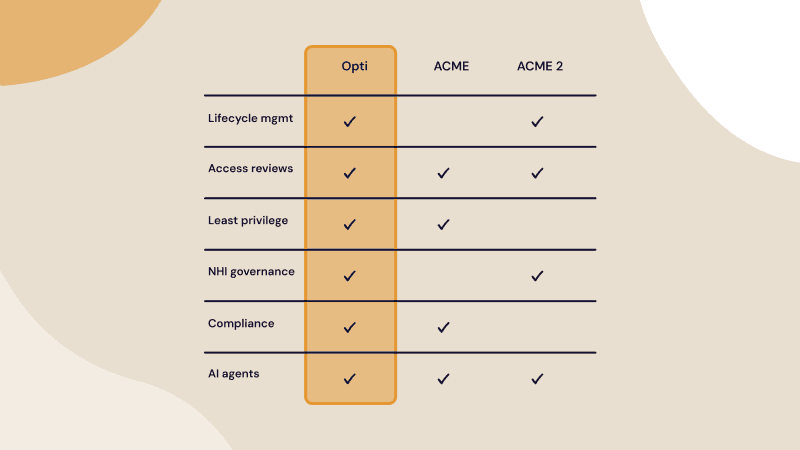
Opti is an AI-native identity and access management platform whose Access Intelligence capability gives you a living access graph of every identity, entitlement, and usage pattern across your enterprise. Instead of pulling fragmented data and manually validating permissions, Opti continuously consolidates identity, access, and entitlement data and aligns it with your policies, roles, and usage insights, so you can produce access reviews instantly, demonstrate least privilege, and surface risk before auditors come knocking.
Key capabilities of Opti Access Intelligence:
Living access graph: Builds AI-native visibility into identities, entitlements, and usage across every system, so you can understand who has access and why in a single, actionable view.
Business context mapping: Goes beyond simple access lists to map specific entitlements with rich business context, including access inherited through group memberships and system rules.
Continuous audit readiness: Continuously consolidates identity, access, and entitlement data aligned to policies, roles, and usage, letting you produce access reviews instantly and demonstrate least privilege at any time.
Evidence-backed recommendations: A workflow-aware LLM weighs policies, roles, peer usage, and risk to deliver fast, explainable, audit-ready suggestions for enforcing least privilege.
Plain-English access queries: A natural language interface lets you ask questions like "Who has admin access to SAP?" and get instant, actionable answers without SQL or filters.
Early change detection: Continuous sync keeps your access map current across systems, flagging changes and policy violations early, triggering reviews, and recommending fixes.
Graph as a control plane: Make real-time changes to entitlements and permissions directly from the interactive access graph to remediate inappropriate access on the spot.
Ready to turn point-in-time reviews into continuous, audit-ready governance? Explore Opti Access Intelligence to see how it works.