
TL;DR: Privileged access management software controls, monitors and audits accounts with elevated permissions. Opti is best for AI-native least-privilege automation, Idira for large-enterprise PAM consolidation, StrongDM for cloud-native infrastructure access, and Securden for unified PAM on a mid-market budget.
What Is Privileged Access Management Software?
Privileged Access Management (PAM) software secures, controls, and monitors elevated administrative accounts and sensitive credentials across an organization's IT systems. PAM works alongside identity governance and administration (IGA) as a complementary subdiscipline of IAM. IGA governs who should have privileged access by managing identities, roles, approvals, and access reviews, while PAM controls how that privileged access is used once granted. Together, they cover both the governance and operational sides of privileged access
Core capabilities of PAM software include:
Privileged credential vaulting: Stores privileged passwords, keys, tokens, and secrets in an encrypted repository with controlled access.
Automated password and secret rotation: Changes privileged credentials automatically on a schedule, after use, or when compromise is suspected.
Just-in-time privileged access: Grants elevated permissions only for an approved task or time window and removes them automatically afterward.
Least-privilege enforcement: Limits users and machine identities to the minimum privileged permissions required for their responsibilities.
Privileged session management: Brokers and controls privileged connections to sensitive systems without exposing underlying credentials.
Session recording and monitoring: Records and monitors privileged activity for auditing, investigation, policy enforcement, and threat detection.
Privileged account discovery: Finds unmanaged administrator, service, application, cloud, and other privileged accounts across the environment.
Risk-based access controls: Adjusts authentication, approval, access duration, and restrictions based on identity, entitlement, device, resource, and behavioral risk.
Privileged Access Management Software at a Glance
The table below summarizes the key differences between the solutions covered in this guide. We explore each one in more detail in the sections that follow.
Category | Solution | Best For | Key Strengths | Things to Consider |
AI-driven identity security | Opti | Automating IAM governance and least-privilege enforcement | Access graph, plain-English policies, one-click remediation | No credential vault or session brokering of its own |
AI-driven identity security | Veza | Visualizing effective permissions across enterprise systems | Access Graph, 500+ prebuilt risk queries, access reviews | Cost and setup complexity reported for smaller projects |
AI-driven identity security | Silverfort | Protecting privileged accounts without deploying a vault | Automatic privilege discovery, virtual fencing, JIT policies | Version upgrades require vendor approval before rollout |
AI-driven identity security | Apono | Just-in-time cloud access for engineers and AI agents | Dynamic role creation, Slack and CLI requests, 200+ services | UI gaps and integration work reported by some users |
Enterprise PAM suites | Idira Privileged Access Manager | Large enterprises consolidating PAM, IAM and governance | Vaulting, zero standing privileges, session isolation, ITDR | Complex console, intricate setup and upgrade processes |
Enterprise PAM suites | BeyondTrust Password Safe | Unified privileged credential, secrets and session management | Automated discovery, Smart Rules, DevOps secrets, JIT control | Complex deployment requiring a separate SQL database |
Enterprise PAM suites | Delinea Secret Server | Enterprise credential vaulting with automated discovery | Discovery, password rotation, session monitoring, resilience | Setup complexity and cost relative to competitors |
Enterprise PAM suites | One Identity Safeguard | Password vaulting with session recording and analytics | PASM platform plus PEDM, sudo and AD bridge extensions | Complex deployment in large hybrid environments |
Enterprise PAM suites | WALLIX PAM | Agentless PAM across IT and OT environments | Bastion session and password management, PEDM, remote access | Reporting and analytics capabilities reported as weak |
Infrastructure and DevOps | StrongDM | Continuous authorization for fast-changing infrastructure | Agentless gateway, runtime authorization, session recording | Onboarding effort and pricing reported by larger teams |
Infrastructure and DevOps | Teleport | Vault-free privileged access for engineering infrastructure | Cryptographic identity, ephemeral privileges, agentic control | Self-hosted setup and RBAC configuration are involved |
Infrastructure and DevOps | HashiCorp Vault | Identity-based secrets management for apps and pipelines | Secrets, certificates, keys, encryption as a service | Complex installation and high-availability cluster setup |
IT operations and mid-market | ManageEngine PAM360 | Full-stack PAM integrated with wider IT management tooling | PASM, PEDM, CIEM, secrets management, behaviour analytics | Scalability and dashboard clarity noted by reviewers |
IT operations and mid-market | Securden Unified PAM | End-to-end PAM in a single package at mid-market pricing | Vaulting, sessions, EPM, vendor access and secrets in one suite | Windows-only server requirement and limited automation |
IT operations and mid-market | miniOrange PAM | Agentless PAM for hybrid environments and third-party access | Vaulting, JIT elevation, session monitoring, anomaly detection | Initial setup often needs vendor assistance |
How Does Privileged Access Management Software Work?
Here’s an overview of the process used by PAM software:
First, it discovers or registers privileged accounts, credentials, and identities across an organization's infrastructure.
It then places sensitive credentials under centralized management, often storing them in an encrypted vault instead of exposing passwords or secrets directly to users and applications.
When privileged access is required, PAM verifies the requesting identity and evaluates access policies. Depending on the policy, it may require multifactor authentication, an approval, or additional checks based on risk.
The system can then issue temporary credentials or broker a session to the target resource without revealing the underlying password.
During the session, PAM can restrict commands, monitor activity, and record events for auditing or investigation.
After access ends, it can revoke temporary permissions or rotate the credential.
This process reduces standing privileges and limits the useful lifetime of compromised credentials.
What Types of Privileged Accounts Does PAM Software Protect?
Administrator Accounts
Administrator accounts provide elevated permissions for managing operating systems, applications, network devices, and user accounts. They may:
Install software
Change configurations
Create users
Modify security controls
Because these accounts have broad permissions, compromised administrator credentials can give attackers extensive access to an environment. PAM software protects administrator accounts by controlling when and how their privileges are used. It can require multifactor authentication and approval, provide temporary access, and broker sessions without exposing passwords. Session monitoring and audit logs also help security teams trace administrative actions to individual users.
Related content: Read our article about types of user permissions and permission models.
Root and Superuser Accounts
Root and superuser accounts provide the highest level of access on operating systems such as Linux and Unix. These accounts can:
Modify system files
Change permissions
Manage processes,
Access data owned by other users
Their broad privileges make them especially sensitive security targets. PAM software can restrict direct use of root and other superuser accounts. Instead, users can receive temporary elevation for approved commands or sessions based on their roles. PAM can also rotate root passwords, record privileged activity, and remove elevated permissions when the authorized task is complete.
Service Accounts
Service accounts are non-human identities (NHIs) used by services, background processes, scheduled jobs, and integrations to access systems and resources. They often run continuously and require elevated permissions, making them difficult to manage through controls designed for human users. PAM software can:
Vault and rotate service account credentials
Restrict their permissions
Monitor their use without disrupting dependent services
NHIs and agentic identities are now among the fastest-growing categories of privileged accounts in many environments. As their numbers increase, PAM helps teams discover these accounts, identify excessive or unused privileges, and manage credentials throughout the identity lifecycle.
Application and Machine Identities
Applications, machines, workloads, APIs, and AI agents use non-human identities to authenticate and perform actions without direct human involvement. AI agents are an increasingly important privileged account type because they may autonomously access:
Databases
Cloud services
Business applications
APIs
Administrative tools
Their dynamic behavior and ability to act across multiple systems can make privileged access especially difficult to govern. PAM software protects application, machine, and AI agent identities by managing secrets, keys, tokens, and other credentials used for privileged access. It can provide credentials at runtime, rotate them automatically, enforce least-privilege policies, and record access for auditing. For AI agents, these controls help limit which systems and actions an agent can access while reducing persistent or embedded credentials.
Related content: Read our article about non-human identity security gaps and how to mitigate them.
Database Administrator Accounts
Database administrator accounts have elevated permissions for managing database systems. Depending on the platform, they can:
Create users
Change permissions
Modify database settings
Read or alter sensitive records
Compromise of these accounts can expose large amounts of business or customer data. PAM software controls access to database administrator credentials and can require authentication or approval before a session begins. It can also provide time-limited access and record administrative sessions for review. These controls help organizations separate routine database use from privileged administration.
Cloud Privileged Accounts
Cloud privileged accounts include administrators, account owners, subscription administrators, and identities assigned powerful cloud roles. These identities may control:
Infrastructure
Identity policies
Storage
Networking
Security settings
Excessive or persistent cloud permissions increase the impact of compromised credentials. PAM software can provide privileged cloud access only when a user or workload needs it. It may assign a privileged role temporarily and remove it after a specified period or task. This just-in-time approach reduces standing privileges while maintaining records of who received elevated cloud permissions and when.
DevOps and CI/CD Credentials
DevOps tools and CI/CD pipelines use privileged credentials to access source repositories, artifact stores, cloud platforms, deployment systems, and production infrastructure. These credentials are often used automatically during builds and deployments. If exposed in scripts, configuration files, or logs, they can provide attackers with access to critical systems.
PAM software stores DevOps secrets centrally and supplies them to authorized tools at runtime. It can:
Rotate credentials
Limit which pipelines can retrieve them
Maintain audit records of secret access
Integrating PAM with automation also reduces the need for developers to handle production credentials directly.
Third-Party and Vendor Accounts
Third-party vendors and contractors may require privileged access for maintenance, technical support, or system administration. These users often connect from outside the organization's network and may need access only to a small number of systems. Permanent or broadly shared vendor accounts can create unnecessary security exposure.
PAM software can provide vendors with temporary access limited to approved systems and time periods. It can require multifactor authentication, approval, and session monitoring before allowing privileged activity. Access can then be revoked automatically when the maintenance window, contract, or authorized task ends.
Core Capabilities of Privileged Access Management Software
1. Privileged Credential Vaulting
Privileged credential vaulting stores passwords, keys, tokens, and other sensitive credentials in a centralized encrypted repository. Instead of giving users direct access to credentials, PAM software can retrieve them when an authorized user or system needs to connect to a protected resource.
The vault also provides a central point for applying access policies and tracking credential use. Organizations can restrict who can retrieve credentials, require approval for sensitive accounts, and maintain audit records. This reduces credential sharing and limits exposure in spreadsheets, scripts, configuration files, and other insecure locations.
2. Automated Password and Secret Rotation
Automated rotation changes privileged passwords, API keys, and other secrets according to a schedule or security event. PAM software generates a new credential, updates it on the target system, and stores the updated value in the vault. Rotation can also occur after a privileged session or suspected compromise.
Frequent rotation reduces the period during which a stolen credential remains useful. Automation is particularly important for service and application accounts because manual changes can break dependencies. PAM systems can coordinate credential updates with applications, services, and scheduled tasks that depend on the secret.
3. Just-in-Time (JIT) Privileged Access
Just-in-time privileged access grants elevated permissions only when they are required for a task. Instead of maintaining permanent administrator privileges, a user requests access and receives it for an approved period. PAM software removes the privileges when that period expires.
JIT access reduces the number of accounts with standing administrative permissions. This limits opportunities for attackers who compromise ordinary user accounts. Organizations can combine JIT access with approvals, multifactor authentication, ticket references, and other checks for higher-risk systems.
4. Least-Privilege Enforcement
Least-privilege enforcement limits users, workloads, and other identities to the minimum privileged access required for their responsibilities. PAM software can assign permissions based on roles, resources, tasks, or approved commands and remove privileges when they are no longer needed. HRIS platforms can serve as a source of truth for role-based privileged access provisioning, using attributes such as job function, department, and employment status to determine appropriate access.
Effective least-privilege controls also account for separation of duties (SoD) and toxic permission combinations. PAM software should flag combinations of entitlements that create risk even when each permission appears justified individually. This helps prevent a single identity from accumulating conflicting capabilities, such as the ability to initiate and approve the same sensitive transaction.
5. Privileged Session Management
Privileged session management brokers connections between authorized users and protected systems. Users may connect through the PAM platform rather than logging in directly with privileged credentials. The platform can inject credentials into the session without displaying the underlying password to the user.
PAM software can also control session duration, permitted targets, and activities performed during the connection. Sessions can be terminated when authorization expires or suspicious behavior occurs. This provides tighter control over administrative access to servers, databases, network devices, and other critical resources.
6. Session Recording and Monitoring
Session recording captures privileged activity for auditing, investigation, and compliance purposes. Depending on the PAM product and protocol, records may include video, terminal commands, keystrokes, file transfers, connection details, and other session events.
Monitoring can also identify activity that violates security policies or differs from expected behavior. PAM software may generate alerts or terminate sessions when it detects prohibited commands or other high-risk actions. Detailed records help investigators determine who accessed a system and what actions they performed.
7. Privileged Account Discovery
Privileged account discovery identifies accounts, credentials, and identities with elevated access across servers, databases, applications, cloud platforms, directories, and other systems. PAM software can scan environments to find unmanaged administrator accounts, service accounts, embedded credentials, and other privileged identities that are not yet under centralized control.
Discovery should also incorporate usage telemetry, including last-used data and access frequency. These signals help identify dormant privileged accounts, stale credentials, and permissions that exist but are rarely or never used. Inventory data alone shows what privileged access exists; usage data helps determine whether that access remains active and justified.
8. Risk-Based Access Controls
Risk-based access controls adjust privileged access requirements according to the risk of an identity, entitlement, request, or session. PAM software can consider factors such as resource sensitivity, privilege level, device state, location, authentication context, and recent activity. Higher-risk access can trigger additional approval, stronger authentication, shorter access periods, or denial.
AI-based controls can add more specific risk signals. Peer-group analytics can identify users whose privileged access differs significantly from others in similar roles, while anomaly detection can flag unusual commands or behavior during privileged sessions. PAM platforms can also automatically classify high-risk privileged entitlements, helping security teams prioritize reviews and apply stronger controls to permissions with greater potential impact.
Notable Privileged Access Management Solutions
How we selected these tools: We shortlisted privileged access management solutions based on credential vaulting, just-in-time and least-privilege enforcement, privileged session management and recording, privileged account discovery, and coverage of non-human and AI identities.
AI-Native Identity Security and Least-Privilege Platforms
1. Opti

Best for: Automating IAM governance and least-privilege enforcement
Strengths: Access graph, plain-English policies, one-click remediation
Things to consider: No credential vault or session brokering of its own
Opti is an AI-native identity and access management platform that ingests, normalizes and analyzes human, non-human and agentic identities across an organization's applications. It builds a living access graph of identities, entitlements and usage, then uses that context to find risky access and excessive privileges.
Rather than stopping at detection, Opti's identity workflow engine builds automated policies and remediation plans. It revokes stale entitlements, enforces least privilege and initiates just-in-time access workflows, with human approval retained for the changes that warrant it. The platform deploys in hours and connects to more than 250 integrations, including homegrown applications.
Key features include:
Living access graph: Unifies identities, entitlements and business context into a single view. The graph is interactive, so entitlements and permissions can be changed directly from it rather than through a separate console.
Plain-English policy authoring: Policies are written in ordinary language, such as restricting production system access to engineers, and Opti continuously scans for violations without any coding.
Natural language access queries: Questions like which accounts hold admin access to a given application return instant answers, removing the need for SQL or manual filtering.
Just-in-time access control: Elevated privileges are granted only when requested and approved, and permissions expire once the task is complete so no standing access remains.
Dynamic privilege analysis: Aligns access with actual usage in real time, tightening and removing unused entitlements to reduce privilege bloat and shrink the identity attack surface.
Non-human and AI agent governance: Discovers and right-sizes service accounts, API keys, cloud workload identities, vault secrets, database roles and LLM-based agents across IaaS, SaaS, PaaS and on-premises systems.
Adaptive role mining: Connects to Okta or Entra and maps the real role structure within hours, then proposes role updates as people move, with SoD constraints defined in plain English.
Continuous access reviews: Consolidates identity and entitlement data, scopes campaigns to outliers and high-risk roles, and produces audit-ready evidence on demand.
Limitations (based on publicly available sources):
Early-stage vendor: Founded in 2024 and funded through a seed round in late 2025, so the production track record is shorter than that of long-established PAM suites.
Limited independent review coverage: Not yet listed on the major peer review platforms, so buyer feedback comes largely from vendor case studies rather than aggregated user reviews.
Governance layer rather than a vault: Works alongside existing identity infrastructure and does not replace credential vaulting or session brokering.

Source: Opti
2. Veza

Best for: Visualizing effective permissions across enterprise systems
Strengths: Access Graph, 500+ prebuilt risk queries, access reviews
Things to consider: Cost and setup complexity reported for smaller projects
Veza is an identity security platform built around an Access Graph that maps relationships between human and machine identities, applications, systems and data sources. It translates system permissions into create, read, update and delete terms so teams can evaluate effective permissions instead of interpreting abstract role names.
The platform combines identity security posture management with identity governance, covering access reviews, lifecycle management, access requests and separation of duties. More than 300 agentless, read-only integrations connect identity providers, cloud platforms, data systems and on-premises applications.
Key features include:
Access Graph: Traverses users, groups, roles and policies to connect every identity to its effective permissions across connected systems, including local, machine and service accounts.
Prebuilt risk queries: Over 500 queries detect privileged users, dormant permissions, policy violations and misconfigurations, and can generate remediation tickets automatically.
Activity monitoring: Tracks who has actually accessed key resources rather than only who can, supporting role right-sizing and removal of dormant entities.
Access reviews: Builds certification campaigns that prioritize risky access first and give reviewers the context needed to approve or reject each item.
Access AuthZ: Provisions and deprovisions across systems through a single endpoint, with dry-run checks to catch policy violations before they happen and an immutable audit trail.
Open Authorization API: Extends coverage to homegrown, legacy and custom applications without requiring professional services engagements.
Non-human identity inventory: Catalogs service accounts, keys and secrets, assigns ownership, and flags expired credentials and over-permissioned accounts alongside human identities.
Limitations (as reported by users on PeerSpot):
Cost for smaller deployments: Described as expensive and difficult to justify on smaller projects.
Setup complexity: Initial configuration is reported as complex and dependent on integrating multiple systems.
Enforcement depth: Some users describe the platform as strong on visibility and insight but wanting more direct enforcement tooling.
Support escalation: Issues sometimes need escalation beyond first-line support before they are resolved.

Source: Veza
3. Silverfort

Best for: Protecting privileged accounts without deploying a vault
Strengths: Automatic privilege discovery, virtual fencing, JIT policies
Things to consider: Version upgrades require vendor approval before rollout
Silverfort Privileged Access Security operates from within the IAM layer rather than through vaults or proxies. It continuously identifies and tiers privileged accounts based on actual authentication activity, covering service accounts, shadow admins, cloud administrators and AI-generated identities that traditional tools often miss.
Controls are enforced inline and at runtime, so escalation paths are blocked as they are attempted rather than discovered afterwards. The capability sits at the centre of the vendor's vaultless PAM offering, and can either extend an existing PAM deployment or operate where no vault has been rolled out.
Key features include:
Automated privileged account discovery: Continuously maps and tiers privileged identities from authentication behaviour, with no manual tagging or configuration required.
Virtual fencing: Limits where a privileged account can be used by source, protocol or destination, stopping misuse, privilege escalation and lateral movement in real time.
Just-in-time and least-privilege enforcement: Removes persistent access to reach zero standing privileges across on-premises, cloud and hybrid environments.
Runtime protection at scale: Applies unified, real-time enforcement to every privileged identity without deploying vaults or proxies.
Service account protection: Discovers, monitors and protects non-human accounts that traditional PAM tools frequently leave unmanaged.
Rapid deployment: Built to go live within days across existing environments, with capped implementation expenses.
Compliance-oriented controls: Enforces audit-ready privileged access controls that map to industry standards and regulatory frameworks.
Limitations (as reported by users on G2):
Upgrade process: Moving to a newer version requires approval from support or an account manager before updates are pushed to appliances.
Past stability issues: Earlier releases had problems with virtual nodes, addressed through workarounds and patches.
Pricing: Some reviewers consider the cost high relative to their budget.

Source: Silverfort
4. Apono

Best for: Just-in-time cloud access for engineers and AI agents
Strengths: Dynamic role creation, Slack and CLI requests, 200+ services
Things to consider: UI gaps and integration work reported by some users
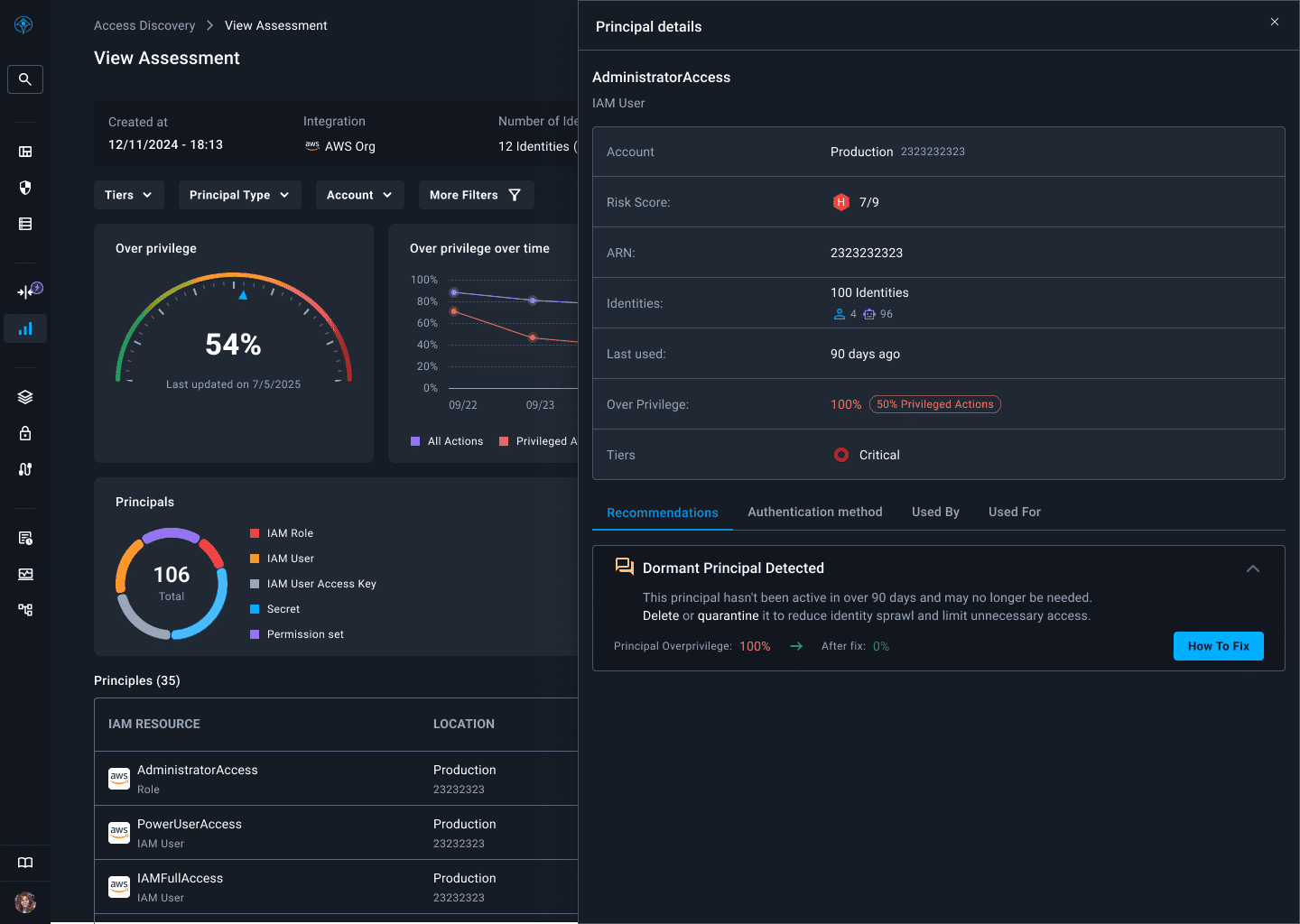
Apono, now part of 1Password, replaces standing permissions with just-in-time and just-enough access for humans, service accounts and AI agents. It maps standing privileges, unused permissions and shadow access across AWS, Azure, GCP and more than 200 services, then provisions temporary grants that expire automatically.
Instead of maintaining a library of pre-built roles, the platform creates IAM roles, permissions and access policies at request time in the native policy language of the target cloud or database. Each access decision factors in who is requesting, what they are trying to do, the environment and the associated risk.
Key features include:
Dynamic role creation: Builds scoped roles on demand at request time and expires them automatically, so there are no pre-staged roles to maintain or clean up.
Requests through existing tools: Engineers request access via Slack, Teams, Jira, CLI, MCP or an AI assistant, with policy-based approvals returned in seconds rather than through a ticket queue.
Resource-level granularity: Grants access to specified S3 buckets, database tables or Kubernetes namespaces rather than to entire roles.
Break-glass access: Gives on-call responders immediate access to production systems during incidents while preserving complete audit trails.
Database access control: Centralizes granular, time-bound permissions across MySQL, PostgreSQL, MongoDB and other databases.
Access threat detection and response: Identifies anomalous access request patterns and terminates suspicious sessions to stop lateral movement.
Compliance reporting: Logs every request, approval and action, with one-click reports for SOC 2, ISO 27001, HIPAA and GDPR.
Limitations (as reported by users on G2):
Onboarding experience: Initial connection can take time, with unclear error messages when a cloud IAM configuration template is rejected.
Interface gaps: Some screens lack back or cancel controls and are only reachable from other screens rather than from the side menu.
Integration effort: Certain integrations still require research and setup work, though reviewers note this has improved over time.
Product feedback loop: Some reviewers report inconsistent responsiveness to feature requests and occasional access instability.
Source: Apono
Enterprise Privileged Access Management Suites
5. Idira Privileged Access Manager

Best for: Large enterprises consolidating PAM, IAM and governance
Strengths: Vaulting, zero standing privileges, session isolation, ITDR
Things to consider: Complex console, intricate setup and upgrade processes
Idira is Palo Alto Networks' identity security platform, built on the CyberArk portfolio acquired in 2025 and rebranded in May 2026. Existing CyberArk deployments continue to operate as before under the new branding. Idira Privileged Access Manager unifies credential vaulting, zero standing privileges and session isolation in a single enforcement model.
Coverage runs from workforce users through to cloud engineers, across on-premises, hybrid and multi-cloud infrastructure. The wider platform also spans machine and agentic identity security, with secrets and certificate management modules sitting alongside the traditional privileged access controls.
Key features include:
Zero standing privileges: Context-aware ephemeral privileges are created when a task begins and destroyed when work ends, leaving no dormant credentials to steal.
Vaulting and rotation: Automated credential vaulting and rotation protects system-level accounts and bridges into just-in-time workflows for a staged migration.
Cloud and Kubernetes access: Agentless, brokered access to AWS, Azure, Google Cloud and Kubernetes through native CLI and consoles, with JIT entitlements replacing static IAM roles.
Endpoint privilege security: Removes standing local administrator rights on Windows, macOS and Linux, replacing them with on-demand, policy-based application elevation.
Session isolation and recording: Brokers and isolates privileged sessions across infrastructure and SaaS, with AI-generated summaries surfacing anomalous commands in real time.
Third-party access: Browser-based, just-in-time access scoped to specific tasks for external contractors, removing VPN and bastion host dependencies.
Identity threat detection and response: Analyses signals across the identity estate and can terminate risky sessions or raise authentication requirements automatically.
Limitations (as reported by users on PeerSpot):
Console complexity: The management console offers extensive functionality but is described as difficult to work with.
Setup and upgrades: Initial deployment and upgrade processes are reported as intricate and in need of simplification.
Connector coverage: Users ask for more plugin connectors across device types, and report integration issues with SAML.
Support responsiveness: Slow response and resolution times reported during technical and critical issues.
Cost: Pricing is considered high and poorly suited to startups and smaller organizations.

Source: Idira (Palo Alto Networks)
6. BeyondTrust Password Safe

Best for: Unified privileged credential, secrets and session management
Strengths: Automated discovery, Smart Rules, DevOps secrets, JIT control
Things to consider: Complex deployment requiring a separate SQL database
BeyondTrust Password Safe manages privileged passwords, accounts, keys, secrets and sessions for people, machines and AI agents, and also secures non-privileged employee passwords used for business applications. It combines privileged account and session management with secrets management in one product.
The product scans and profiles applications and assets, auto-onboarding privileged, shared and service accounts, then applies discovery-driven dynamic policy and Smart Rules to cut manual administration. It can be deployed in AWS or Azure, or as a virtual or physical appliance.
Key features include:
Automated discovery and onboarding: Scans, identifies and profiles applications, assets and SSH keys, automatically onboarding privileged, shared and service accounts.
Credential and password management: Secures privileged passwords, DevOps secrets and SSH keys, with automated rotation and controlled access.
Application password management: Eliminates hard-coded credentials in scripts, files, code and embedded keys, with controlled access defined through REST APIs.
Privileged session management: Logs and monitors all credential and account activity, and allows administrators to record, lock or terminate suspicious sessions.
Just-in-time access control: Considers the day, date, time and location of a request from a user, machine or AI agent across on-premises, hybrid and multi-cloud environments.
Workforce passwords: Extends enterprise-scale visibility and audit support to employee business application accounts, reducing shadow IT exposure.
Zero trust enclave architecture: Brokers privileged sessions through a gateway so no user or machine identity connects directly to a protected resource.
Integrations: Connects with IAM, SIEM, RPA and ITSM platforms, including bi-directional integration with SailPoint and incident enrichment in ServiceNow.
Limitations (as reported by users on PeerSpot):
Deployment complexity: Requires setting up a separate database on a SQL server, which extends deployment time.
Documentation: Described as complicated and inconsistent, with information spread across multiple documents.
Support dependence: Users report relying heavily on the support team for backend updates and troubleshooting.
Directory constraints: Named accounts face limitations tied to directory size when Smart Rules are used.
Patching: Compatibility issues with server updates have affected maintenance processes.
7. Delinea Secret Server

Best for: Enterprise credential vaulting with automated discovery
Strengths: Discovery, password rotation, session monitoring, resilience
Things to consider: Setup complexity and cost relative to competitors
Delinea Secret Server is an enterprise-grade privileged access vault that identifies, secures, monitors and manages privileged account access with a full audit trail for compliance evidence. It covers AI, machine, service, application, administrator and root accounts from one place.
Built-in automation handles discovery, password rotation and session monitoring, which the vendor positions as a way to secure privileged accounts in weeks rather than months without extended professional services engagements. Secret Server acts as the foundation of the wider Delinea platform.
Key features include:
Encrypted vault: Secures privileged account credentials in an encrypted store that enforces strong password management controls while keeping access seamless for authorized users.
Comprehensive discovery: Automatically identifies and inventories privileged accounts across the environment and brings them under centralized management.
Automated credential management: Simplifies password creation, rotation and expiration using templates, and enforces check-in and check-out, role-based access and approval workflows.
Advanced session monitoring: Records and monitors privileged sessions with detailed audit trails, customizable reports and AI-driven session analysis.
Resilient Secrets: Replicates credentials so they remain available and accessible during disruption, supporting business continuity.
Application-to-application access: Allows applications to communicate securely without requiring direct user access to the underlying credentials.
Centralized control: Manages credentials for human, machine and AI identities from a single platform, reducing blind spots and administrative overhead.
Limitations (as reported by users on PeerSpot):
Setup and deployment: Described as complex and requiring specialized expertise.
API and integration: Challenges reported with API tokenization and connecting external systems.
Documentation: Guidance around connectors and integrations identified as needing improvement.
Support: Limited assistance reported on complex configuration issues.
Cost and flexibility: Considered costly compared with competitors and less flexible in large enterprises.

Source: Delinea Platform
8. One Identity Safeguard

Best for: Password vaulting with session recording and analytics
Strengths: PASM platform plus PEDM, sudo and AD bridge extensions
Things to consider: Complex deployment in large hybrid environments
One Identity Safeguard is a privileged access management platform combining privileged password vaulting, session management and behavioural analytics in one product. It covers human administrators, service accounts, machine workloads and AI agents, and is available on-premises, hybrid or as SaaS through Safeguard On Demand.
Safeguard PASM is the core platform, with just-in-time access at its centre. Coverage extends through separate modules for privilege elevation on Windows and Unix, sudo policy management, Active Directory bridging and remote privileged access without VPN.
Key features include:
Credential vaulting and rotation: Discovers and onboards accounts, then vaults and rotates passwords, SSH keys, API keys, DevOps secrets and cloud credentials through an automated workflow engine.
Session recording and replay: Full session audit with real-time alerting and blocking, full-text search with OCR, and continuous authentication throughout the session.
Transparent proxy mode: Protocol-level enforcement that requires no workflow changes and can run standalone or alongside an existing vault.
Privileged analytics: Machine learning anomaly detection using keystroke and mouse biometrics, screen content and command analysis, with risk-ranked alerts and automated session termination.
Just-in-time privilege management: Brokers temporary, scoped privileged access for both human and non-human identities to limit the attack surface.
Privilege elevation modules: Application privilege management on Windows, and centralized control of privileged commands and sudo policy on Unix and Linux without exposing root credentials.
Active Directory bridging: Integrates Unix, Linux and macOS into Active Directory for centralized authentication, single sign-on and extended Group Policy.
Limitations (as reported by users on PeerSpot):
Deployment complexity: Initial deployment and configuration can be involved, particularly in larger hybrid environments.
Scalability planning: Users advise thorough analysis before production rollout after encountering scaling issues.
Integration documentation: Connecting to Active Directory and other internal tools is complicated by unclear documentation.
Support: Response times and effectiveness in resolving issues identified as areas for improvement.
Reporting flexibility: Dashboards and reports would benefit from more client-specific customization.
Source: One Identity
9. WALLIX PAM

Best for: Agentless PAM across IT and OT environments
Strengths: Bastion session and password management, PEDM, remote access
Things to consider: Reporting and analytics capabilities reported as weak
WALLIX PAM secures privileged accounts across IT and OT environments, covering administrators, IT personnel, third-party vendors and the software and machines that hold elevated permissions. Its core component, Bastion, brings privileged password and session management together for discovery, management and auditing of credential activity.
Deployment is agentless and available on-premises, in the cloud, as SaaS or hybrid, including through cloud marketplaces. Organizations running several deployments can configure, automate and oversee them centrally through WALLIX One Console.
Key features include:
Session Manager: Grants access only to authenticated users on authorized targets, producing an audit trail that includes full-colour video, transcript and metadata.
Password Manager: Controls password complexity, security and rotation so credentials can no longer be shared or stolen.
Web Session Manager: Secures and audits web application access through Bastion and Access Manager without additional installation or setup.
Application-to-application password management: Removes hard-coded passwords from clear-text scripts and configuration files to support secure automation.
Privilege elevation and delegation management: Removes local admin rights and controls permissions at application and process level across endpoints.
Remote access: Provides secure access for remote employees and third-party vendors to in-house and cloud applications from a centralized platform.
Cyber-physical system support: Connects to proprietary remote applications without changing processes, installing fat clients or reconfiguring the target.
Limitations (as reported by users on PeerSpot):
Behaviour analytics: Absent from the product, with development reported as planned for cloud versions rather than on-premises deployments.
Password manager performance: Described as slow by some users.
Reporting: Considered weak compared with alternatives and in need of clearer execution.
Automation: Identified as an area that could be enhanced alongside password management.
Licensing model: A unified licensing approach suggested as an improvement.

Source: WALLIX
Infrastructure and DevOps Privileged Access
10. StrongDM

Best for: Continuous authorization for fast-changing infrastructure
Strengths: Agentless gateway, runtime authorization, session recording
Things to consider: Onboarding effort and pricing reported by larger teams
StrongDM, now part of Delinea, provides least-privilege access to infrastructure that changes constantly. Once a human, machine or AI agent connects through StrongDM, authorization is evaluated for the life of that session rather than only once at login.
Every request to a database, container or cloud resource passes through the same four steps: request and approval, connection through the gateway, monitoring and enforcement, then automatic revocation once work finishes. Credentials are proxied and never exposed, and the gateway is agentless with nothing installed on target resources.
Key features include:
Runtime authorization: Continuously evaluates policy during a session, so a hijacked session or compromised credential is caught mid-action rather than after the fact.
Broad protocol coverage: Reaches PostgreSQL, MySQL, Oracle, SQL Server and MongoDB, plus Kubernetes, EKS, GKE, AKS, Docker, AWS, Google Cloud, Azure, Linux, Windows RDP, SSH and internal web applications.
Just-in-time access: Approvals arrive through Slack, Teams or an ITSM, and access disappears the moment the task is complete.
Native tool integration: Works with the terminal, IDE and CLI tools developers already use, alongside a desktop client for business users.
Agentic AI control: Applies the same authorization, auditing and policy enforcement to AI agents and MCP tooling as to any other identity.
Granular audit trails and session recording: Logs every access request, action and approval, and records sessions for compliance and forensic review.
Existing vault support: Works natively with Delinea Secret Server and other vaults, extending them rather than replacing them.
Limitations (as reported by users on PeerSpot):
Enterprise onboarding: Initial setup and onboarding reported as harder in large organizations with complex processes.
Pricing: Considered expensive by some reviewers.
Update communication: Frequent updates and their impact on existing deployments could be communicated and controlled better.
Authentication options: Relies on time-based one-time passwords or Duo, without support for passwordless methods such as biometrics or hardware keys.
Stability: Periodic crashes reported by some users.

Source: StrongDM
11. Teleport

Best for: Vault-free privileged access for engineering infrastructure
Strengths: Cryptographic identity, ephemeral privileges, agentic control
Things to consider: Self-hosted setup and RBAC configuration are involved
Teleport provides a unified identity layer for humans, machines and AI agents accessing infrastructure. Rather than distributing shared secrets, it issues cryptographic identities secured by a hardware root of trust, so there are no credentials or secrets available to leak.
Privileges are ephemeral and expire, which removes standing access and narrows the lateral movement surface. The platform spans zero trust access, identity governance, machine and workload identity, and extends the same controls to agents and MCP tooling. Teleport also maintains an active open source project and community.
Key features include:
Cryptographic identity: Every identity is secured by a hardware root of trust using HSM, TPM or biometrics, eliminating credentials that can be stolen or reused.
Ephemeral privileges: Just-in-time privileges that expire automatically, so standing access never accumulates across the estate.
Vault-free privileged access: Protects infrastructure through zero trust and zero standing privileges rather than a credential vault.
Access requests: Engineers request elevated access when needed instead of holding permanent rights, removing manual SSH key management and bastion hosts.
Agentic AI control: Extends visibility, unified access control and identity security to agents, LLMs and MCP tools across AI infrastructure.
Session audit: Connection and session logging supports forensic investigation, onboarding and offboarding, and continuous monitoring for programmes such as FedRAMP through FIPS endpoints.
SSO and RBAC: Integrates with existing identity providers and MFA to deliver consistent access control across supported protocols.
Limitations (as reported by users on PeerSpot):
Initial setup: Setup and RBAC configuration identified as areas needing improvement.
Self-hosted deployment: Complex and time-consuming compared with the managed option.
Session recordings: Cannot be downloaded or shared, which limits documentation and evidence handling.
Error visibility: Devices sometimes fail to reflect errors, complicating troubleshooting.
Scale: Managing several hundred services presents difficulties.

Source: Teleport
12. HashiCorp Vault

Best for: Identity-based secrets management for applications and pipelines
Strengths: Secrets, certificates, keys and encryption as a service
Things to consider: Complex installation and high-availability cluster setup
HashiCorp Vault provides identity-based security for secrets and other sensitive data, authenticating and authorizing access across users, machines, services and AI agents. It centrally stores, accesses and distributes secrets programmatically rather than leaving them embedded in code, pipelines and configuration files.
Vault also issues short-lived, just-in-time credentials that expire automatically, whether they are handed to a developer, a CI/CD pipeline or an AI agent at runtime. Access policies are enforced as code, and a single API automates secret creation, consumption, expiration and rotation.
Key features include:
Centralized secrets storage: Stores, accesses and distributes secrets programmatically to humans, machines and AI agents from one place.
Short-lived credentials: Issues just-in-time credentials that expire automatically, limiting how long a leaked secret remains useful.
Certificate management: Generates, rotates and revokes certificates on demand.
Key management: Distributes, rotates, enables and disables encryption keys across the environment.
Data protection: Provides encryption as a service to protect data in transit and at rest.
Policy as code: Enforces access policies programmatically, including policies scoped to AI agents and agentic workflows, and speeds up audit preparation.
Extensibility: Pluggable authentication and secrets engines allow custom integrations to be developed for unusual requirements.
Limitations (as reported by users on PeerSpot):
Installation complexity: Setup is described as complicated and operationally challenging.
High-availability deployment: Deploying a high-availability cluster adds further configuration difficulty.
Integration coverage: Better integration with systems such as SAP and stronger PCI compliance support requested.
Documentation and support: Identified as lacking detail, with more examples and use cases wanted.
Customization: More advanced features and configuration options requested by reviewers.

Source: HashiCorp
IT Operations and Mid-Market PAM
13. ManageEngine PAM360

Best for: Full-stack PAM integrated with wider IT management tooling
Strengths: PASM, PEDM, CIEM, secrets management and behaviour analytics
Things to consider: Scalability and dashboard clarity noted by reviewers
ManageEngine PAM360 is a full-stack privileged access management platform covering the main PAM disciplines in one product. It automatically discovers, onboards, stores and manages privileged users, accounts and resources used by both people and software from a central console.
The product sits within ManageEngine's wider IT management portfolio, with integrations reaching from service desk to SIEM for secure access provisioning and correlation of privileged access events across the enterprise. Deployment options are flexible, and the product is compliant with standards including NIST, PCI-DSS, FISMA, HIPAA, SOX and ISO/IEC 27001.
Key features include:
Privileged account and session management: Launches remote sessions, moderates and audits privileged access, and records sessions in real time from a central console.
Privilege elevation and delegation management: Applies just-in-time privilege elevation, application and command controls, and least-privilege workflows for access provisioning.
Cloud infrastructure entitlements management: Monitors and regulates cloud entitlements, remediating excessive privileges, policy violations and other blind spots.
Endpoint privilege management: Applies granular restrictions on critical applications, including just-in-time access, child process control and local administrator rights.
Secrets management: Secures credentials for machines, applications, services, scripts, processes and DevOps pipelines.
Privileged user behaviour analytics: Uses AI and ML-driven anomaly detection to spot suspicious activity patterns.
Key and certificate lifecycle management: Manages SSH keys and SSL/TLS certificates to prevent service downtime and impersonation attacks.
Limitations (as reported by users on PeerSpot):
Scalability: Rated as average by reviewers.
Authentication: Multi-factor authentication reported as missing by some users.
Performance: Latency when accessing resources identified as an area to improve.
Documentation: Installation, usage and configuration guidance flagged as needing work.
Dashboard: Presentation could be clearer and easier to interpret.

Source: ManageEngine
14. Securden Unified PAM

Best for: End-to-end PAM in a single package at mid-market pricing
Strengths: Vaulting, sessions, EPM, vendor access and secrets in one suite
Things to consider: Windows-only server requirement and limited automation
Securden Unified PAM brings password management, privileged account and session management, endpoint privilege management, vendor access and secrets management into one package. It discovers and protects administrator, service and web application passwords, keys and secrets across human, workload and AI identities.
The suite maps to the main Gartner PAM categories, covering PASM, PEDM, secrets management, CIEM and remote PAM. It can be deployed on-premises or as SaaS, with installation designed to take minutes and a production-ready rollout achievable in under a month.
Key features include:
Privileged account discovery: Finds privileged accounts on Windows, Linux and Mac systems, virtual machines, databases, servers and applications.
Credential vaulting and rotation: Stores and automatically rotates system, admin and service account passwords, manages SSH keys, and handles service account dependencies.
Session launch and recording: One-click RDP, SSH and SQL connections without exposing credentials, with session recording, playback, keystroke and command tracking.
Just-in-time access workflows: Enforces password request and release approvals with automatic reset after time-limited access, plus short-lived ephemeral credentials.
Endpoint privilege management: Removes local admin rights on endpoints and applies granular application control for standard users.
Vendor privileged access management: Zero trust remote access without VPN, agents or open firewall ports, with complete session recording and audit trails.
Machine and AI identity management: Secures API keys, tokens and service accounts, removes hard-coded credentials, and covers AI agents and MCP servers.
Cloud entitlement management: Manages AWS entitlements, discovers privileged admin policies and prunes excessive cloud permissions.
Limitations (as reported by users on Gartner Peer Insights):
Automation depth: Automation features described as limited even where privileged session monitoring works well.
Windows server dependency: The service runs only on Windows servers, which adds licensing and resource requirements.
Session recording maturity: Still requires RDS licensing for remote sessions, in line with other PAM products.
Web application session recording: May need custom integration work to achieve a seamless result.

Source: Securden
15. miniOrange PAM

Best for: Agentless PAM for hybrid environments and third-party access
Strengths: Vaulting, JIT elevation, session monitoring, anomaly detection
Things to consider: Initial setup often needs vendor assistance
miniOrange PAM secures privileged accounts with centralized control and least-privilege enforcement across hybrid environments. It covers administrators, service accounts, non-human identities and third parties, combining a password vault, session monitoring, AI anomaly detection and just-in-time elevation.
Deployment is agentless, with no endpoint software required across servers, cloud and hybrid infrastructure. Cloud-native, on-premises and hybrid deployment options are available, and the product maps to compliance frameworks including PCI DSS, ISO 27001, SOC 2, HIPAA and SOX.
Key features include:
Password vault and rotation: Centralized vault enforcing strong passwords, MFA and automated credential rotation for SSH, RDP, VNC, Active Directory and databases, using AES-256 encryption.
Just-in-time access management: Dynamically provisions temporary access rights exactly when needed, eliminating standing privileges across sessions.
Real-time session monitoring and control: Live streaming, recording, playback, instant session termination and anomaly detection with dashboard alerts.
Vendor privileged access management: Controls access for vendors, contractors and external partners with MFA, approval workflows, time-bound access and session monitoring, removing shared credentials.
Endpoint privilege management: Enforces least privilege on Windows, macOS and Linux by removing local admin rights and controlling application privileges.
AI agent and non-human identity security: Centralized credential management, access controls and audit trails for service accounts, applications, scripts, APIs and AI agents.
Granular access control: Role-based permissions define who can reach which resources, when access is permitted and what actions can be performed.
Limitations (as reported by users on G2):
Initial setup: Implementation typically requires expert support from the vendor at the outset.
Deployment timelines: Rollout can take longer in sensitive environments.
Password filling: Reviewers who rate session recording highly note that password filling needs improvement.

Source: miniOrange
Conclusion
Privileged access management reduces the risk created by powerful accounts, credentials, and permissions by controlling when privileged access is granted and how it is used. Organizations should evaluate credential and secrets management, just-in-time and least-privilege controls, session monitoring, privileged account discovery, and coverage for human, non-human, and AI identities. The right approach should also integrate with existing identity governance and security systems while providing enough automation, auditability, and scalability to manage privileged access consistently across cloud, on-premises, and hybrid environments.